Still ask your friend to help item moving to mule?
Do u feel waste time to lv up characters 1 by 1 in baal room?
[What do u need?]
1.Diablo Client Soft (classic + expension cdrom)
2.Several sets of cdkeys. (depends on yourself. lol)
[How to get another cdkey?]
1.You can buy another game cd from Blizzard.
2.You can buy cdkey only from some online shops or just
ITEMPUB. lol. (check the links at the LEFT-SIDE)
[Here we go!!]
1.Download Cdkey d2-cdkey.zip, and unzip it, you'll get 2 files. (auto-cdkey.reg / d2-cdkey.exe).
----Download here
http://www.itempub.com/LinkFile/download/d2-cdkey.zip2.Modefy auto-cdkey.reg.
--Mouse Right-Click on file, select "Edit", you'll find the Text:
----REGEDIT4 ----[HKEY_CURRENT_USER\Software\Blizzard Entertainment\Diablo II] ----"owner"="Yourname" ----"d2cdkeympq"="cdkey.mpq" ----"d2xcdkeympq"="cdkey.mpq"----"d2cdkey"="CLASSIC" ----"d2xcdkey"="EXPANSION"--Change the owner name as whatever as u like. such as "pub_cdkey".
--Change d2cdkeympq and d2xcdkeympq name as whatever u want. such as "pub1.mpq", both names should be same.
--Use your cdkeys just bought instead of CLASSIC and EXPANSION. (make sure "-" was deleted, and classic/expansion is correct).
--Save and Exit.
3.Install to regedit.
--Left-Double-Click auto-cdkey.reg we just modified, and click "OK" button.
4.Make cdkey mpq file.
--Left-Double-Click the another file named d2-cdkey.exe, you'll see the picture:
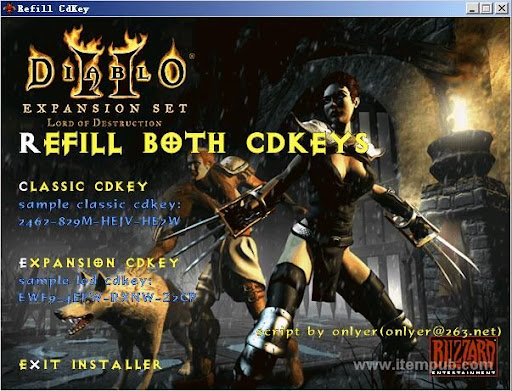
--Click "REFILL BOTH CDKEYS", and find your diablo folder, click ok.
--Check your diablo folder, u'll find there is a new file, named as "pub1.mpq".(the name u filled in the reg file)
5. How to use the mpq file?
--To use the cdkey mpq file, u need download d2loader, you can find in our forum, and download it.
--Copy d2loader to your diablo folder. (example c:\dialbo2)
--Creat a d2loader shortcut.
--Right-Click on d2loader shortcut, select properties.
--Change the target "C:\Diablo2\d2Loader.exe" to "
C:\Diablo2\d2Loader.exe -w -mpq pub1.mpq -title "pub1"".
6.Enjoy yourself
--Left-Double-Click the shortcut, and u can use the new cdkey to connect the battle.net now.
7.Add more?
--What u only need to do is make a different mpq name like "pub2.mpq"(must different from before), and do all thing again. Creat a new Shortcut, and modify it. Then you can open 2 windows one time ^^v
[At Last]
1.Play game for fun, relax, not hard.
2.Hope u enjoy our sevice at itempub. ty.


